Windows 10 / 11 · SQLite · PostgreSQL · MySQL · Oracle · DynamoDB · MongoDB · BigQuery
Safe on production, too
Gridge lets you decide how much each connection is allowed to do. On a connection marked as production, a write stops before it reaches the database — and tells you how many rows it was about to touch.
Get itThe tab you thought you were in
When development and production look identical, you find out you were in the wrong tab after the statement has run. An update missing its where clause looks correct right up until the moment you press enter. Neither is something you can take back.
You cannot see where you are pointed
The connection name gets read after the statement runs, not before.
Nothing stops you
Either there is no confirmation, or it says the same thing every time and stops being read.
You cannot tell how much it hits
Running a count to find out is itself the accident on a large table.
Decide the strength per connection
The risk level belongs to the connection, not to the moment. A rail down the edge of the window and a badge in the toolbar keep it visible the whole time.
Development
Unrestricted
Nothing is blocked. For databases on your own machine.
Staging
Confirm before writing
A write raises a dialog showing the statement itself and an estimate of how many rows it will touch.
Production
Read only
Rather than asking, writes are refused. For SQLite, PostgreSQL, MySQL and Oracle the connection itself is opened read-only, so even a statement that slips past the check cannot write.
The guard is doubled. Deciding whether a statement writes is what raises the dialog; on a read-only connection, whatever slips past it is still stopped by something separate. When the check is unsure, it always assumes the statement writes. DynamoDB, MongoDB and BigQuery have no way to open a connection read-only, so the second guard sits inside Gridge too — connect to production with a read-only user or role.
Know the blast radius before you run it
The confirmation shows an estimate of the affected rows. It never runs a count to get there: on a large production table the count alone can take minutes, which turns a safety check into the incident. Gridge reads only the estimate the database already keeps, and when there is none it says "unknown" rather than zero.
What the day-to-day needs
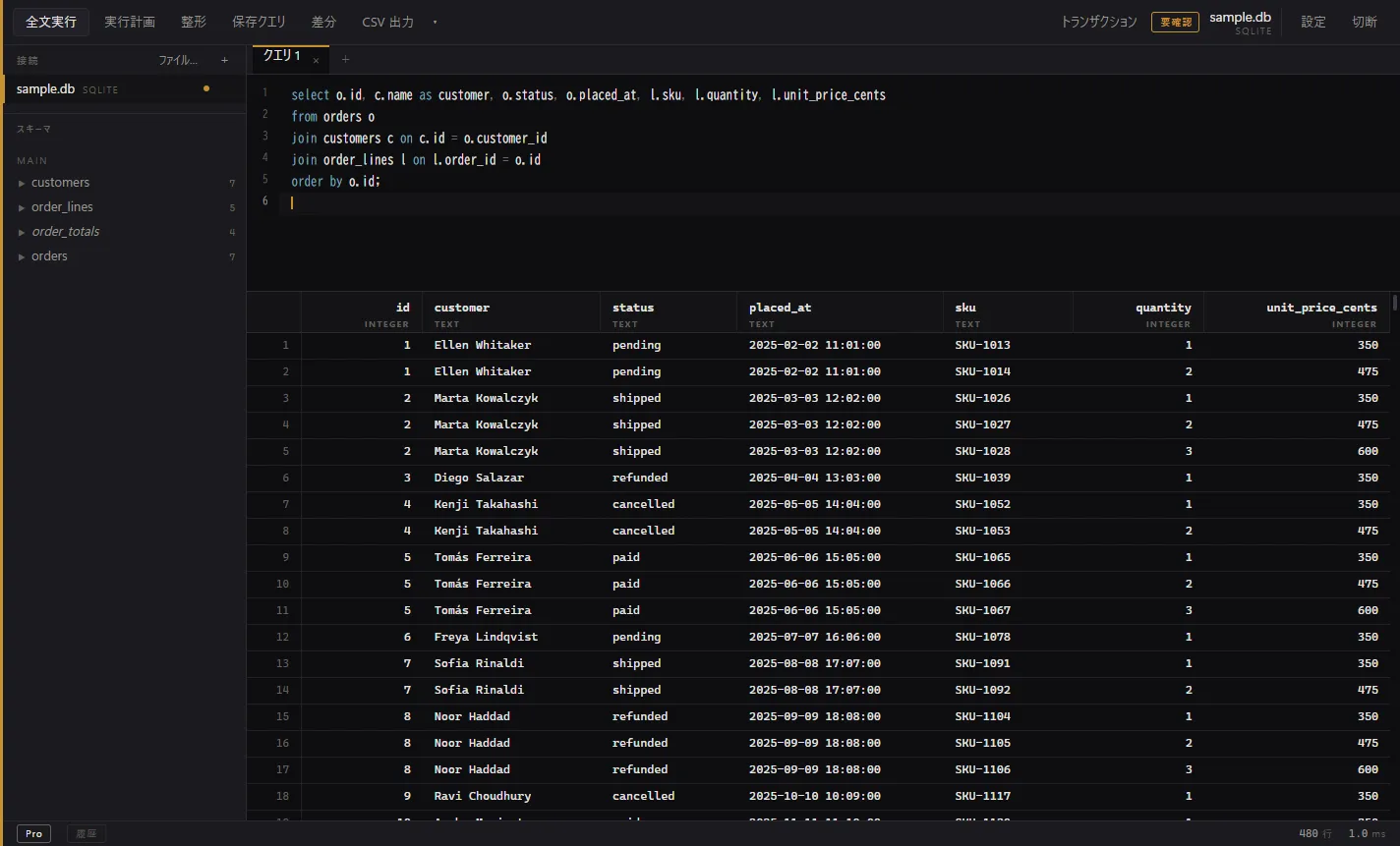
SQL and NoSQL in one grid
SQLite, PostgreSQL, MySQL, Oracle, DynamoDB, MongoDB and BigQuery. Values are shown as they are stored: large integers are not rounded, dates are not silently converted, and two columns with the same name both survive.
Connections through an SSH tunnel
Reach a database behind a bastion host. The host key is always verified, and a key that differs from the one on record is refused rather than offered as a choice.
Transaction control
The badge appears even when you type begin into the editor yourself. Disconnecting with work uncommitted asks first.
Checks and formatting before you run
Unclosed parentheses and columns that do not exist on the table get underlined. The check stays quiet when it is unsure, so the underlines keep meaning something.
Tabs for each working surface
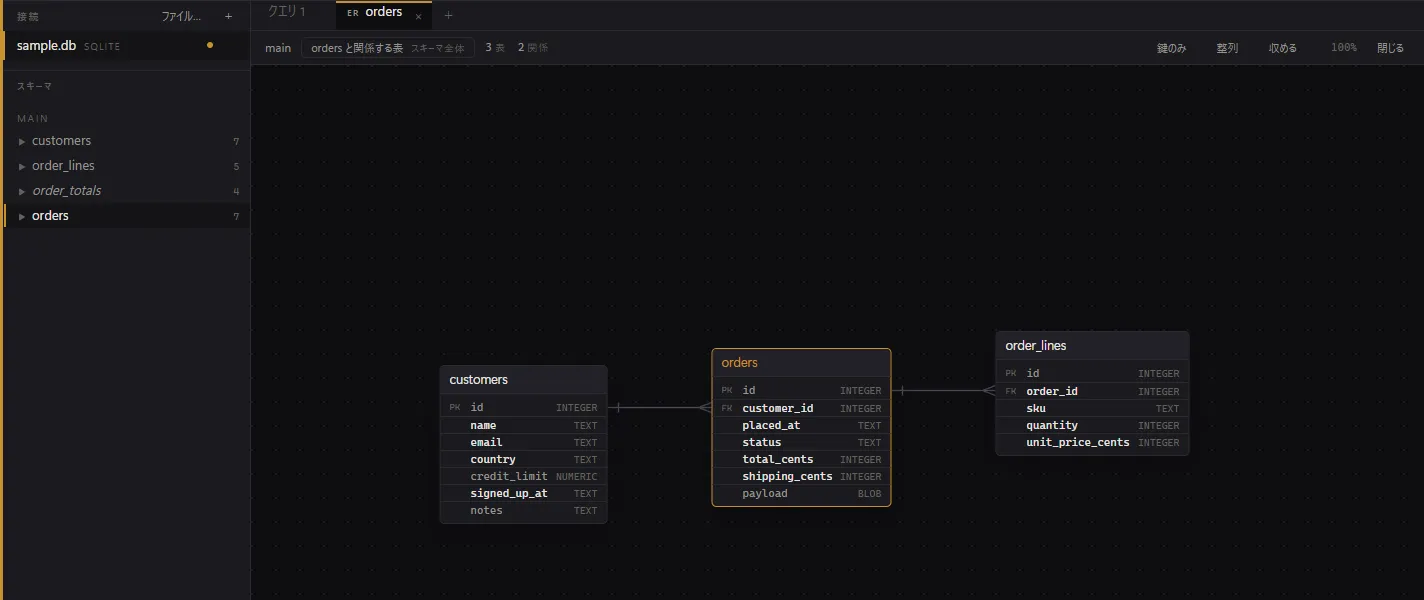
SQL and ER diagrams sit in the same row of tabs. Switching away keeps your undo history and the position you had scrolled the diagram to.
Cell viewer
Open a long text, a JSON document or a binary value and read all of it. Binary is shown as a hex dump.
Screens
For reading a database more deeply
Looking at one database and writing to it safely is free. Crossing between environments, reading deeper, and recording things to reuse — that is where the paid side starts.
Query plans
Only EXPLAIN is sent. ANALYZE is never used, so looking at a plan never runs the statement.
ER diagrams
Drawn from declared foreign keys only. No line is added because two column names happen to look related.
Jump to related rows
Follow a foreign key one step from a cell, to the row it references and to the rows that reference it.
Schema diff and DDL
Compare two environments. Anything that drops a table or a column comes out commented, so no single click destroys data.
Statistics
Row counts, size on disk and per-column distribution, read from the estimates the database already keeps.
Activity monitor
Watch running queries over a second connection. Only the query is cancelled — the other session stays connected.
Audit log
Keep every statement with its connection and safety mode, and search it later by text. The SQL is encrypted at rest.
Formats beyond CSV
JSON, JSON Lines, Markdown tables and INSERT statements. CSV and TSV stay free.
Saved queries with parameters
Name the statements you run often and call them back with values filled in.
Pricing
Everything that protects you stays free. The row estimate, transaction control and the safety modes are all available without paying.
| Feature | Free | Pro |
|---|---|---|
| Per-connection safety mode (unrestricted, confirm before writing, read-only) | Included | Included |
| Confirmation before a write, with an estimate of the rows it touches | Included | Included |
| Transaction control, and cancelling a statement while it runs | Included | Included |
| Connections through an SSH tunnel, with the host key verified | Included | Included |
| Checks and formatting before a statement, the cell viewer, CSV and TSV export | Included | Included |
| Query plans (only EXPLAIN is sent, so looking never runs the statement) | Not included | Included |
| ER diagrams and jumping to related rows | Not included | Included |
| Statistics views and the activity monitor | Not included | Included |
| Schema diff between two environments, and DDL generation | Not included | Included |
| Audit log, saved queries with parameters, and JSON / JSON Lines / Markdown / INSERT export | Not included | Included |
Prices are set in Japanese yen. Payments from outside Japan are charged at $3 (USD) monthly or $30 (USD) yearly. Nothing is added on top — no tax and no fees.
- Getting the app is separate. Gridge itself is free from the Microsoft Store; buying here unlocks the Pro features and does not install anything.
- After payment your licence key is shown on the confirmation page, and the same key is sent to the email address you registered. Enter it on the licence screen inside the app to turn Pro on (that screen opens this same purchase page too).
- Cancel whenever you like. Pro stays on until the end of the period you have paid for, and the free features stay exactly as they are afterwards.
One key covers up to 3 devices at a time, and a device left unused for 30 days drops off by itself.
Requirements
- OS
- Windows 10 version 1809 or later, or Windows 11 (64-bit)
- Databases
- SQLite · PostgreSQL · MySQL · Oracle · DynamoDB · MongoDB · BigQuery
- Interface language
- Japanese and English (follows your OS display language)
- Network
- No communication with the developer while using the free features. Paid features check the licence every 24 hours (and keep working offline for 14 days)
Get it
Install and update through the Microsoft Store. The Store signs the package, so there is no warning when you install it.
Get it from Microsoft StoreThe Microsoft Store is the only way to get Gridge. No installer is distributed separately.